Edit code in Nowa
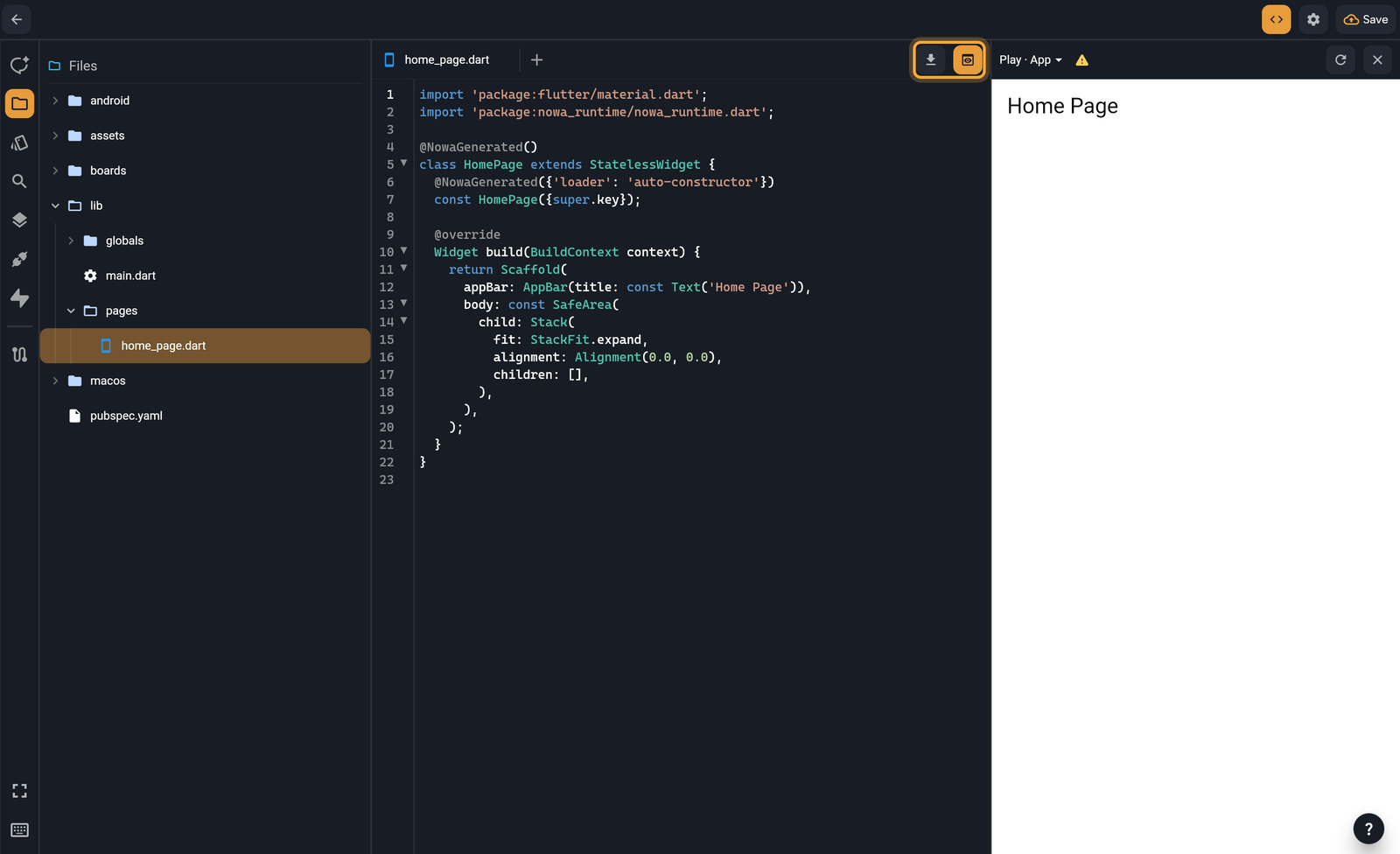
Code mode shows the code behind your app in a full code editor. Flutter apps are written in Dart, so that's mostly what you'll see. Select a widget, click the <> button, and you land on its code: handy for checking what Nowa AI wrote, or for a quick fix by hand.
Open code mode
- Optional: select a widget on the board.
- Click the
<>button in the top bar, next to Settings (the gear). The button has no label, and it stays highlighted while code mode is on. Nowa saves your project first. - The editor opens the file that defines your selection and scrolls to the widget's code. With nothing selected, it opens your home screen's file, or
lib/main.dartif there is none.
The Files icon takes the Library's place, second in the left sidebar (Ctrl/Cmd + 2), and the panel opens on it. It shows the whole project as a tree: lib/ (your app's code), boards/, assets/, pubspec.yaml (the project's settings file) and the platform folders. What's in your project explains each one. When you leave code mode, the panel you were using comes back.
You can also open code mode with Open code mode on the Nothing is open screen. A Dart file with no screen or component in it, such as a model or a global state, opens with an outline of its contents and a View Code button that switches to code mode.
Work with tabs
Each file opens in its own tab above the editor. A tab shows * after its name while the file has unsaved changes.
- Click a file in Files to open it, or move to it with the arrow keys and press Enter.
- Click + (New Tab) to open a blank tab. Its Empty Tab page offers New Widget and Upload a File (which adds a file to
assets/), and lists your Recent Files. Only one blank tab can be open at a time. - Close a tab with its ×, a middle-click, or the shortcut below.
| Action | Windows / Linux | macOS |
|---|---|---|
| New tab | Ctrl + T | Cmd + T |
| Next tab | Ctrl + Tab | Control + Tab |
| Previous tab | Ctrl + Shift + Tab | Control + Shift + Tab |
| Close the tab | Ctrl + W | Cmd + W |
| Search for a file | Ctrl + O | Cmd + O |
Search for a file opens a picker. Type part of a file name, move with ↑ and ↓, and press Enter. It lists the files in lib/ with their paths. To search inside files, see Manage project files. On the board, the same keys open the Library search instead.
Edit code
The editor colors Dart, JSON, YAML, XML, HTML and Markdown. You can edit any text file in the Files tree, including pubspec.yaml. With the View Only role, the editor is read-only.
| To | Do this |
|---|---|
| Find | Press Ctrl/Cmd + F. Aa matches case and .* uses a regular expression. Previous and Next step through the matches, and Esc closes the bar. |
| Find and replace | Press Ctrl/Cmd + Alt/Option + F, type the new text, then click Replace or Replace All. |
| Autocomplete | Start typing in a Dart file. Suggestions list names in scope, members after a dot, and named parameters inside a call. Pick one with the arrow keys and Enter, or click it. |
| Go to definition | Hold Ctrl/Cmd and hover a name in a Dart file. A name that's defined in your project is underlined. Click it to jump there, even into another file. |
| Copy, cut and paste | Right-click, or use the usual shortcuts. |
Keyboard shortcuts lists the rest, such as commenting and moving lines.
To open a file as plain text, right-click it in Files and choose Show file content. The entry isn't there with the View Only role. In code mode, the edits you type in that tab reach the project when you save.
Outside code mode, a plain text file that opens in a tab, such as a pubspec.yaml match from the Search panel, has a details panel beside the text. It has Font size (13 by default), Word wrap (on by default) and a Compile button. Compile applies your edits to the project. When nothing is waiting, it reads Compiled and is greyed out.
To bring in a snippet or a .dart file instead of typing it, leave code mode and choose Import Dart code... from the Library's Add (+) menu. See Import Dart code.
Save your edits
Your edits reach the board when you save, not on every keystroke. Press Ctrl/Cmd + S, or let auto save run. Auto save is on by default and runs every 20 seconds. To change it, click the save icon in the status bar (Save options). Saving also refreshes the preview.
Nowa AI always works from your latest code. It applies your unsaved edits before it starts.
Fix errors and conflicts
- Syntax errors. Once your edits are saved, a red banner above the code shows the number of errors and the first message. Click it to open the Errors panel. The counts in the status bar and the Problems tab list them too. See Find and fix problems.
- A file that changed under you. If Nowa AI, the board or another tool changes a file while you have unsaved edits in it, the banner says "This file changed while you were editing it". Click Keep mine to keep your text and save it, or Reload to load the file as it is now and drop your edits.
Preview next to your code
Click Show preview (the eye icon at the right end of the tab bar) to open your app beside the editor. The menu at the top left of the pane picks the mode.
| Mode | What it shows |
|---|---|
| Play · App | Your whole app, played the way Instant Play plays it. This is the default. |
| Play · File | The screen or widget declared in the open file. A file with no widget says "This file has no widget to preview. Switch to App to run the whole app." |
| Run | The real, compiled app, as in Run your app. |
The play modes are interpreted, so a warning icon reminds you that they aren't 100% accurate. The preview reloads when your edits are saved. In the play modes, Reload preview rebuilds it at any time. Click Hide preview to close the pane.
Open in VS Code or download your code
The button next to Show preview depends on the project.
- Local projects Open in VS Code opens the folder in VS Code at the file you're viewing, or at
lib/main.dartif it isn't a Dart file. See Use Nowa with VS Code. - Cloud projects Code download opens a popup where you compress your project and download it as a zip. See Download your code.
Leave code mode
Click Back at the top left, or click <> again. Nowa saves your project and returns to the board. If some of your edits aren't saved yet, Unsaved code changes lists the files first and asks what to do:
- Save saves the edits and updates the board.
- Discard drops them.
- Cancel keeps you in code mode.
Or ask Nowa AI: "Add a function that formats a price with two decimals." It edits the same files you see here. Read what it changed in code mode.
Next steps
- Manage project files: add, move and search files.
- Add packages: bring in ready-made building blocks from pub.dev.
- Write your own code: use your own widgets and functions on the board.
- What Nowa can show on the board: see which code the board draws, and check the rest with Run.