What Nowa can show on the board
The board and Instant Play don't compile your app. Nowa reads your Dart and draws it itself, which makes them instant and means a few things look different or don't show up. None of this changes your real app: Run compiles everything for real, so it always shows the true result, the same one your users get when you publish.
| Board and Instant Play | Run | |
|---|---|---|
| How it works | Nowa reads your Dart and draws it | Your real app is compiled and started |
| Your own code | Most of it. What Nowa can't read is skipped, or kept as code and shown as a placeholder | All of it |
| Packages | Popular ones have built-in support. Others show as placeholders | All of them, for real |
The warning icon in the Instant Play controls says it too: "In board preview is not 100% accurate, run the app to see the real output".
What shows as a placeholder
| You see | What it means | What to do |
|---|---|---|
| A small box crossed by two lines, only as big as a widget's name | The widget comes from a package that Nowa has no built-in support for. | Click Run to see the real widget. |
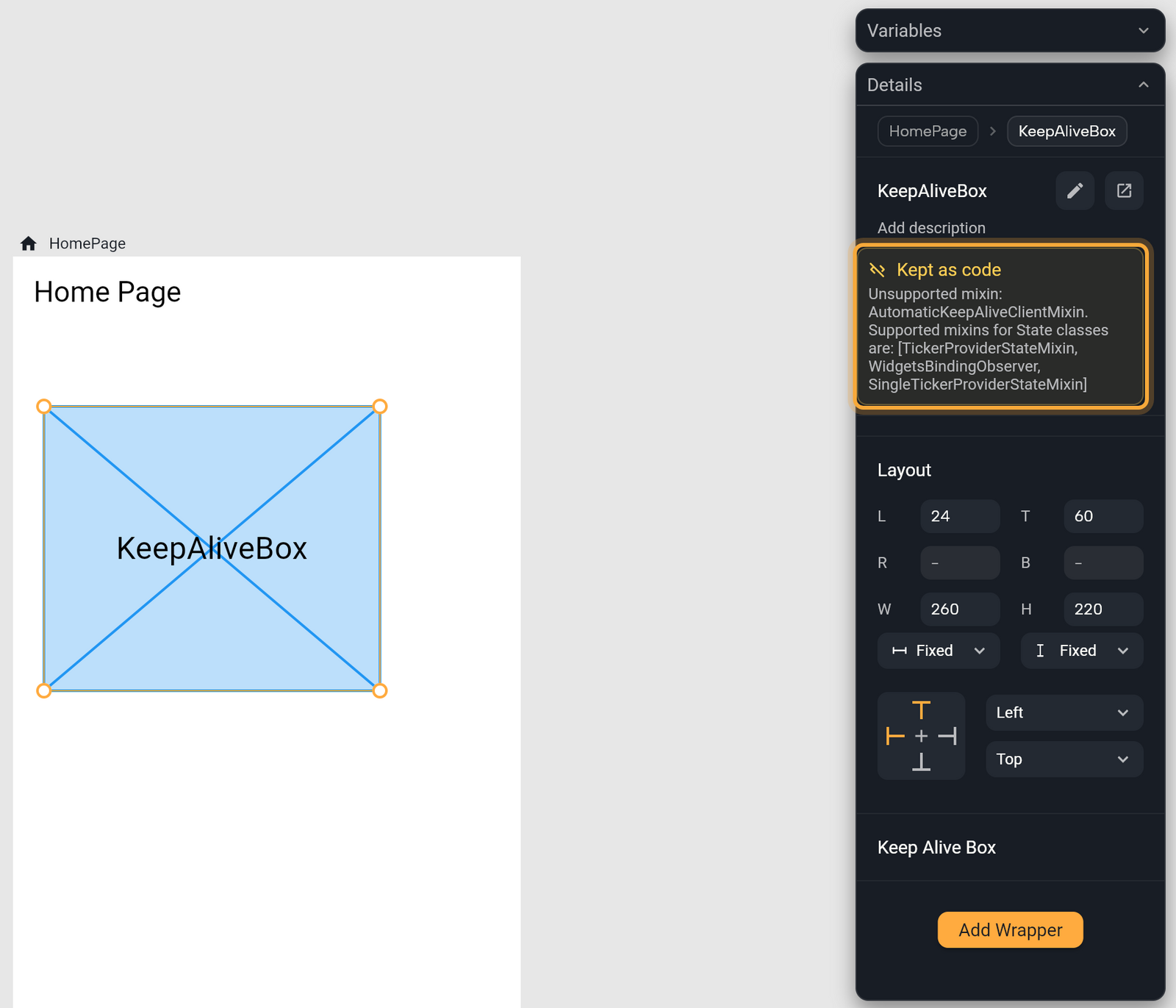
| A light blue panel with a blue crossed box and a widget's name in large letters | A widget of yours that Nowa keeps as code. Nowa couldn't read it, or you imported it as custom code. | Select it. If Nowa couldn't read it, Details shows Kept as code and the reason. |
| A small crossed box with no name | A widget that Nowa has no value for, shown as a small slot so it doesn't take over your layout. | Give it a value, or click Run. |
Functions that Nowa doesn't run return a stand-in value, such as [...] for text, 0 for a number or false for a true/false value. That covers a function marked @CustomFunction, a method Nowa couldn't read, and any function from a package without built-in support. Each call is written to Logs: "calling: <name>" for your own code and "Calling <name>" for package functions.
Where a value is empty, the board fills in a stand-in so the design isn't blank. See Design with realistic content. A value that may be empty, such as an optional number, true/false value, color or enum, stays empty instead, so the widget's own default shows.
A package widget that wraps a child shows that child instead of a placeholder, and so does a method you call on a widget that gives back a widget, such as an effect. A widget that can't be drawn where a scroll view needs a sliver (a piece of a scrolling area, in a sliver: or slivers: slot) is drawn as a sliver, so the scroll view keeps working.
What Nowa skips
When your code uses Dart that Nowa can't read yet, Nowa skips only that part and loads the rest of the file. A method it can't read stays as you wrote it, and the rest of its class works normally. You see why in Problems or Details, as described below. Nowa can't read:
| This | Try this instead |
|---|---|
Generators: sync* and async* functions that use yield | Return a list |
extension type | A class, or a regular extension |
List and map destructuring, such as final [a, b] = items; | Read the items by index |
Pattern assignment, such as (a, b) = (b, a); | Use a temporary variable |
A switch case with a when clause, or with a list or map pattern | An if inside the case |
A State class with a mixin other than TickerProviderStateMixin, SingleTickerProviderStateMixin or WidgetsBindingObserver, such as AutomaticKeepAliveClientMixin | Remove the mixin to see the widget on the board, or check it with Run |
These do work: record and object destructuring (final (a, b) = pair;), a switch that matches constants, ||, &&, relational (> 5) and object patterns, enhanced enums, mixins and redirecting constructors. An is check narrows the value inside the same &&, ? : or if, as in other is Trip && other.id == id.
Classes that extend Flutter classes
Widgets, State and ChangeNotifier classes work as you'd expect. You can also extend CustomPainter, CustomClipper, TextInputFormatter, NavigatorObserver, SliverPersistentHeaderDelegate, FocusNode, PreferredSizeWidget, InheritedWidget and Equatable. Any other Flutter class, such as Color in class HexColor extends Color, loads, but its objects aren't real ones. Where Flutter needs the real class, the board uses what the object wraps, for example an inner ImageProvider, or a placeholder of that class, so the screen keeps drawing. Problems warns about it.
Imports and packages
package:imports are the best supported form.partandpart ofaren't followed. When Nowa rewrites a file you changed visually, it keeps thelibrary;,part '...';andpart of '...';lines and adds no generated imports to a part file.showis ignored, so ashowimport brings in the whole file. A conditional import, such asif (dart.library.io), uses its default file.- Nowa loads the packages you list under
dependencieswith a version. It also lists packages with agit:orpath:source, and in a local project loads them from whereflutter pub getput them. Ansdk:package, one that ships with Flutter such asflutter_localizations, counts as installed but isn't loaded. Packages from another host, anything underdev_dependenciesand the packages your packages depend on aren't loaded. See Add packages.
What runs differently
- In a constructor's initializer list,
assert(...)doesn't run, and neither does a positional argument ofsuper(...). The named arguments ofsuper(name: x)are read likesuper.name. Set other fields directly, or usesuper.nameparameters. - A call to
super.method()doesn't run the parent method and gives back nothing. - Putting an object in text, as in
'$item', ignores thetoString()you wrote. Call it yourself, as in'${item.toString()}', or use a getter such asitem.label. - A
trywith more than onecatchclause fails with "Multiple catch clauses are not supported yet" when something is thrown. Use onecatchand check the type inside. - The object a
catchgives you isn't the one that was thrown, so reading its fields givesnull. - Your own
operator []and[]=don't work. Use methods such asget(i)andset(i, v)instead. - Two records with the same values aren't equal:
(1, 'a') == (1, 'a')isfalse. Avoid records as map keys.
How Nowa tells you
- Placeholders. See the table above.
- Details. Select a widget Nowa kept as code. Kept as code shows why. You see nothing there for code you imported as custom code on purpose.
- Problems. Click the problem counts in the status bar. For your own code, it lists a function, enum or other declaration that Nowa couldn't load as
'<name>' could not be loaded: <reason>. It also lists a warning like'HexColor' extends 'Color', which Nowa can read but cannot construct.and every syntax error, one per problem. Nowa keeps the text of a file with a syntax error as you wrote it. See Find and fix problems.
Beyond those, Problems checks only code Nowa generated. To include your own code, click the filter button (Which code Nowa checks) and choose All files. Those checks read your code the way the board does, so a problem can be a false alarm. For an exact check, switch to From Code Analysis and click Run Code Check, which runs flutter analyze.
Check the real result
Click Run. Your own code, your packages and anything the board can't draw run for real, as in the app you publish. If Run reports an error, Run your app explains each one.
Next steps
- Write your own code: control what the board shows for your functions.
- Add packages: see which packages have built-in support.
- Play your app on the board: tap through your screens right on the board.
- Run your app: see the real result.