Projects and account
Everything outside the editor lives here: the dashboard where your projects wait for you, the workspaces you share them in, and your account, plan and help options. Start here to get your bearings, then jump to the page you need.
The dashboard at a glance
After you sign in at app.nowa.dev, you land on the dashboard. The sidebar on the left gets you around, and the main area is where you start new apps and open the ones you have. In a narrow browser window, such as on a phone, the sidebar becomes a drawer.
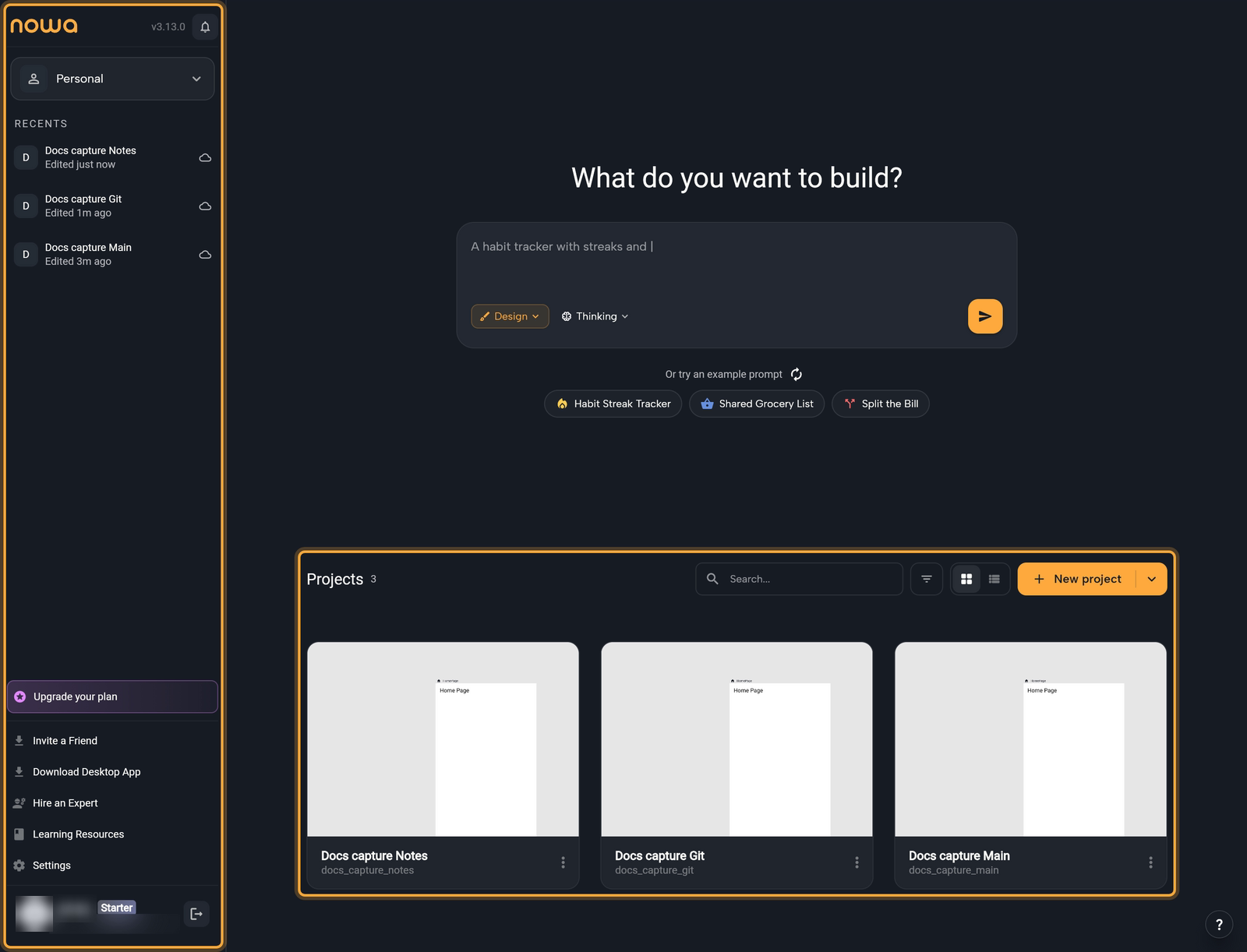
The sidebar, from top to bottom:
| Sidebar item | What it does | Learn more |
|---|---|---|
| Notifications (bell, next to the version number) | Announcements from Nowa. A badge on the bell counts the unread ones. | Get help |
| Workspace switcher (Personal to start with) | Switches between your own projects and your workspaces. Create workspace is in the same menu. | Workspaces and team members |
| RECENTS | Lists up to five recently edited projects. Click one to open it. | Create and manage projects |
| Upgrade your plan | Opens Adjust Plan in Billing. It shows only while an upgrade is on offer for your account. | Plans, billing and AI usage |
| Invite a Friend | Shows your invite link. When a friend signs up with it and verifies their email, you both get credits. | Plans, billing and AI usage |
| Download Desktop App (web app only) | Opens Download Nowa with download buttons for macOS, Windows and Linux, and a line that names the version you get. A button is greyed out when there is no download for that system. You need the desktop app for projects stored on your computer, and to run your app on your phone or an emulator straight from Nowa. It's free on every plan. | Install the desktop app |
| Hire an Expert | Opens a dialog where you can book a free consultation with a certified Nowa expert. | Get help |
| Learning Resources | Opens these docs. | Get help |
| Settings | Opens your account settings: profile, plan, usage and editor setup. | Account settings |
| Your name, plan badge and logout icon | Shows who is signed in. The icon (tooltip Logout) signs you out. | Account settings |
The main area has:
- What do you want to build? Describe an app in your own words and Nowa AI builds the first version. See Build your first app.
- Projects, with Search..., a sort menu, a grid and list switch and the New project button. In the desktop app, projects stored on your computer (local projects) get their own On this device section. See Create and manage projects.
- The ? button at the bottom right, which opens the support panel. See Get help.
Dialogs the dashboard may show
When the dashboard loads, Nowa may open a dialog on its own. None of them change your projects:
- A new version of Nowa is available, when an update is out. See Troubleshooting.
- A short survey that starts with "Question 1 of 4", once per account. See Create your account.
- "How much would you rate Nowa?", from your second visit. See Get help.
- An upgrade offer, if you're on the free plan. See Plans, billing and AI usage.
In this section
- Create and manage projects: start a project, find it again, and move, remove or delete it.
- Project settings: your app's name, icon, permissions and keys.
- Account settings: your profile, email, password, connected accounts and privacy.
- Workspaces and team members: share cloud projects with a team.
- Plans, billing and AI usage: what your plan includes, your invoices and AI credits.
- Get help: support chat, bug reports and the community.
Next steps
- Build your first app: describe an app in the dashboard's prompt box.
- Get ready to publish: set your app's name, identifier and icon, then deploy it.
- Troubleshooting: having trouble right now? Start here.