Get help
Stuck, or something looks broken? The support button puts the Nowa team one click away, and the other ways to get help sit right behind it.
Open the support panel
Click the round ? button at the bottom right of the dashboard or the editor. A red badge on it counts your unread replies. In the editor in a narrow browser window, such as on a phone, open More (⋮) and click Support instead.
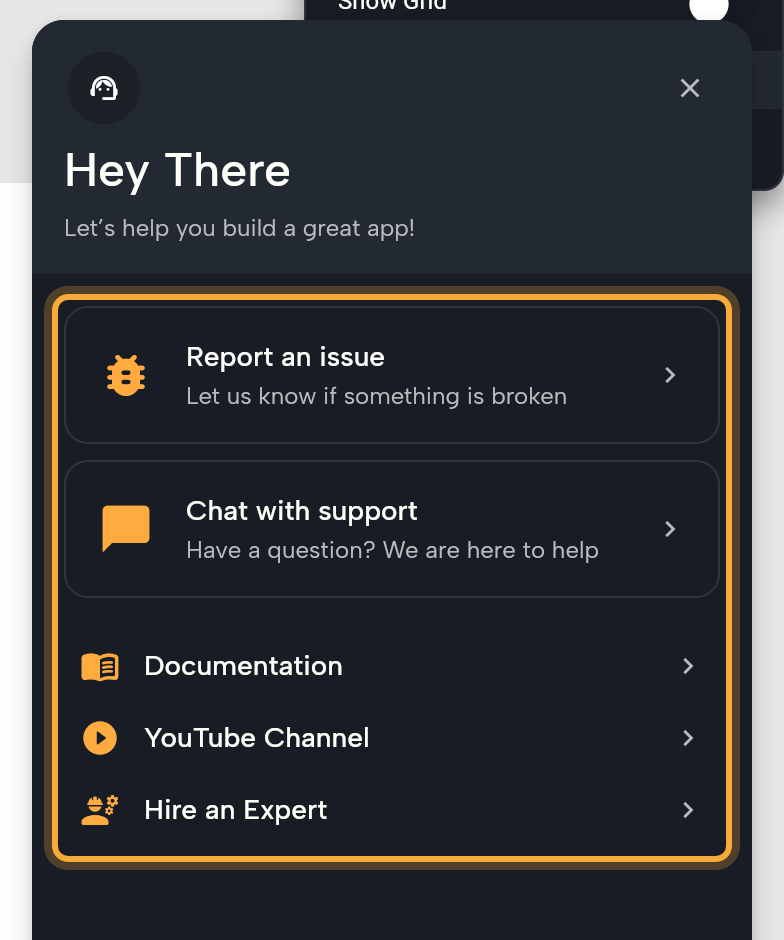
The panel opens on "Hey There" and "Let’s help you build a great app!" with these options:
| Option | What it does |
|---|---|
| Your tickets | Lists your recent conversations with the team. Each shows a status (New, In Progress, Resolving or Resolved) and its age. When you have more than two, a link such as "Show all 4 tickets" expands the list. Click a ticket to read replies and answer. |
| Report an issue | Tells the team something is broken. It needs an open project. On the dashboard it reads "Open a project to report an issue". |
| Chat with support | Asks a question ("Have a question? We are here to help"). |
| Documentation | Opens these docs. |
| YouTube Channel | Opens the Nowa channel. |
| Hire an Expert | Opens the expert dialog (see below). |
Report an issue
The clearer your report, the easier it is for the team to help, and a snapshot of your project lets them look at it as it is.
- Open the project that has the problem, click ?, then Report an issue.
- Describe what happened in the message box ("Type a detailed message..."). Say what you did, what you expected and what you saw instead, for example: "I tapped Book on the booking screen. I expected a confirmation, but nothing happened."
- Keep Include a snapshot of the current project ticked so the team can look at your project. It's on by default and only appears on the first message of a report. Untick it if you'd rather not share your project.
- To add screenshots, click the image button and choose files.
- Click the send button.
For a local project, the snapshot goes up as a zip file. Replies appear on the ? badge and under Your tickets. A dashboard link that carries a ticket ID opens that ticket. If Nowa says "This support conversation isn't accessible with your current account.", sign in with the account that created the ticket.
Two other places open the same form with the details filled in: Report on Nowa AI's "Bug report ready" card (see Chat with Nowa AI), and Report issue on a preview error that says the problem is on Nowa's side (see Run your app).
Ask a question
Not sure how to do something? Click ?, then Chat with support, type your question and send it. You can attach images. Questions don't have the snapshot checkbox. Your conversation stays under Your tickets, so you can come back to the answer later.
Hire an expert
Want hands-on help from someone who knows Nowa well? Click Hire an Expert in the dashboard sidebar or the support panel. The dialog says "Get hands-on help from certified Nowa experts." Click Book a Free Consultation to open a booking page, or Become an expert to apply. The dialog also shows the expert rate.
Learn
- Learning Resources in the dashboard sidebar opens these docs.
- Documentation and YouTube Channel in the support panel open the docs and the Nowa YouTube channel.
- What's new shows what each version added.
Stay up to date
The bell (tooltip Notifications) sits next to the version number on the dashboard and next to your avatar in the editor. A badge counts the ones you haven't seen. Open the bell to read the list, which Nowa then marks as read. Click a notification that has an action to follow it, either a link or the full announcement. "No notifications" means you're caught up.
Announcements can also appear as banners at the bottom right. At most two show at a time, and an announcement past its expiration date no longer shows as a banner. Click the close button (Dismiss announcement) to hide one.
Join the community and contact us
Want to swap ideas and tips with other builders, or write to the team directly?
- Discord to chat with other builders and the team.
- The community forum for questions and answers.
- Email team@nowa.dev.
Share feedback
From your second visit to the dashboard, Nowa asks "How much would you rate Nowa?" a couple of minutes after it loads. Pick a rating, add a comment under "Tell us more about it (optional)" and click Submit Feedback. If you click Cancel instead, it asks again on your next visit.
Next steps
- Troubleshooting for the messages Nowa shows when something goes wrong
- Account settings
- Plans, billing and AI usage