Add packages
Packages are ready-made building blocks from pub.dev, Flutter's package site, such as animations, charts or date tools. They save you from writing that code yourself. Add one in App Settings and Nowa writes it into your pubspec.yaml (the project's settings file, which lists the packages your app uses), loads the package and checks your project for you.
Open the Packages page
- Click the gear in the top bar (Settings), or press Ctrl/Cmd + ,. See Project settings.
- In the General group of the Settings list, click Packages.
The page lists your packages in a table with a Name and a Version column. Type in the Search... box to filter the list by name.
New projects start with five: nowa_runtime (Nowa's own helpers), provider (app-wide data), shared_preferences (values saved on the device), dio (calls to web APIs) and go_router (moving between screens). Leave nowa_runtime in place, because the code Nowa writes imports it.
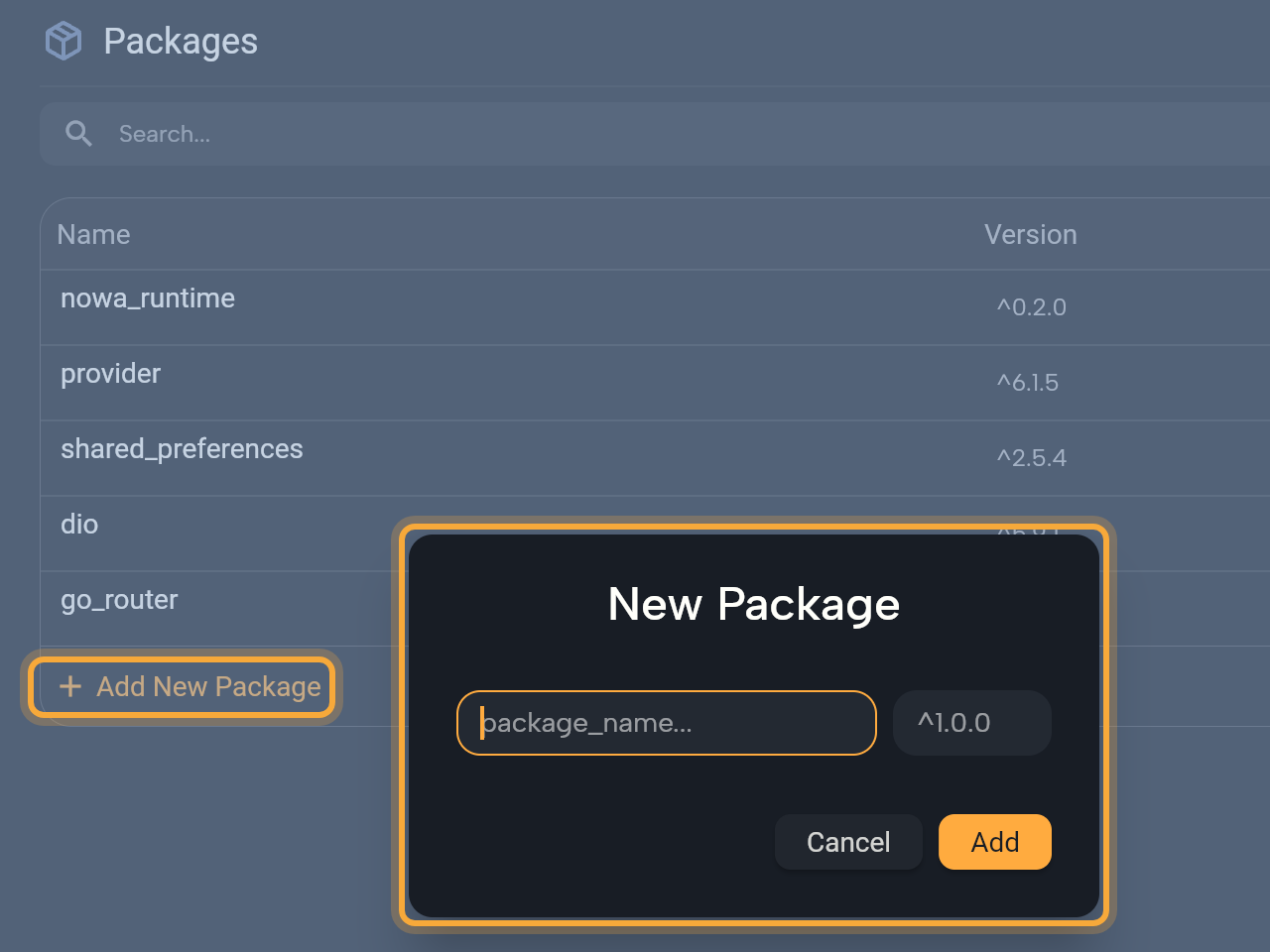
Add a package
- Click Add New Package under the table. The New Package dialog opens.
- Start typing the package name. Nowa suggests matching packages from pub.dev. Pick one, or type the full name.
- Check the version. Nowa fills in the latest one as a caret version such as
^2.1.0, where^means this version or any newer one that stays compatible with it. Change it if you need another. - Click Add. "Loading packages..." shows under the table while Nowa works, then the package appears in the list.
Nowa adds the package to pubspec.yaml, loads it so the board knows what it offers, and refreshes Problems.
The dialog tells you what's wrong: "This field is required" for an empty name or version, "Package is already installed" for a name that's already in the list, and a red error when pub.dev has no package with that name.
A few packages need phone permissions, such as geolocator for location. For those, Add Missing Dependencies opens with "Package <name> requires the following dependencies" and lists each one. Click Add to turn them on, or Cancel to stop adding the package. The same dialog appears when you add a widget that needs a package. See Add widgets.
Change a version
- In the table, click the package's Version and type the new version, such as
^3.0.0. - Press Enter. Nowa updates
pubspec.yamland loads the package again at that version.
In a local project Nowa also runs flutter pub get, Flutter's command that downloads the packages listed in pubspec.yaml.
Don't change the Version of a package that comes from Git or a local path, that is, from a Git repository or a folder on your computer instead of pub.dev. A version you type there replaces its git: or path: entry in pubspec.yaml.
Remove a package
Point at the package's Version and click the × at its right end. Nowa removes it from pubspec.yaml and unloads it. In a local project it also runs flutter pub get.
Code that still imports the package shows a problem: '<name>' is imported but is not in the pubspec. Remove the import, or click Fix in Problems to add the latest version back.
How Nowa loads your packages
- pub.dev, Git and path packages. Nowa loads the packages under
dependenciesthat list a version. Packages with agit:orpath:source are listed too, with an empty Version, and in a local project Nowa loads them from whereflutter pub getput them. Ansdk:package, one that ships with Flutter itself such asflutter_localizations, counts as installed but isn't loaded. A package from another host and anything underdev_dependencies(packages used only by tests and tools, not by your app's code) isn't loaded. If your code imports a dev dependency, Problems says'<name>' is a dev dependency, so Nowa does not load it. Move it to dependencies to use it in lib/. - Only the packages you list. Packages that your packages depend on aren't loaded for you. If your code imports one, add it to your list too.
- After the project opens. Packages load in the background. Problems shows "Loading packages..." and reports nothing until they finish.
- When one won't load. Problems says
'<name>' is installed but failed to load, so nothing it defines is available:and gives the reason. - Built-in support or placeholders. Nowa has built-in support for popular packages, such as
provider,go_router,dio,shared_preferences,flutter_svg,lottie,rive,gap,flutter_animate,google_fontsandsmooth_page_indicator. For any other package, Nowa reads what it offers, but its widgets show as placeholders on the board and its functions return stand-in values. Run uses the real package. See What Nowa can show on the board. nowa_runtime. Nowa keeps it at the version your Nowa release expects (^0.2.0in Nowa 3.13), so a version you type for it is reset when the project opens. That version no longer includessmooth_page_indicator: see Handle the Page indicator migration.
Nowa doesn't list or load packages from another host, so Problems may say such a package "is imported but is not in the pubspec." Don't click Fix for it. Fix looks the name up on pub.dev and, if it finds a package, writes that version over your entry.
Handle the Page indicator migration
Older versions of nowa_runtime came with the smooth_page_indicator package, which draws the dots of a Page View. Version 0.2.0 doesn't. When you open a project that uses those dots without listing the package, Nowa shows Page indicator migration: "nowa_runtime no longer includes smooth_page_indicator. Nowa will add it to your pubspec and import it in <files>."
- Click Migrate. Nowa adds
smooth_page_indicatortopubspec.yamland adds its import to each file that uses it. If adding the package fails, a red message reads "Exception: Could not add smooth_page_indicator to the pubspec" and the dialog stays open. - Click Later to leave everything as it is. The dialog comes back the next time you open the project.
Edit pubspec.yaml yourself
pubspec.yaml is a normal file in code mode. To have Nowa load a new package right away, add it on the Packages page instead. After you change pubspec.yaml by hand, click Pub get (the terminal icon) in the Logs tab of the Console to fetch the packages. See Run your app.
In a local project, Nowa also re-reads pubspec.yaml when files change outside Nowa, for example after a branch switch or an edit in another editor, and loads the dependencies you added there. If that fails, Logs says "Could not load the dependencies added outside Nowa" followed by the error.
Nowa also keeps the assets and fonts lists in pubspec.yaml in step with your assets/ folder. See Images, videos and other files.
Try "Add the intl package and show each order's date as 12 March 2026." Nowa AI can add and remove packages for you. In Plan mode it only writes the plan. If the load packages switch is off, Nowa AI asks you to turn it on. It's on in new projects. See Experimental flags.
Next steps
- Write your own code: wrap a package's widgets and functions in your own code.
- What Nowa can show on the board: see what the board draws from packages.
- Find and fix problems: read the package messages in Problems.
- Run your app: see every package working for real.