Use Nowa with VS Code (Hybrid approach)
A local project is an ordinary Flutter folder, so you can open it in Nowa and in VS Code at the same time. Design screens and wire up logic visually in Nowa, write your own widgets and functions in VS Code, and watch every save show up in the other. You never copy files between the two, and you can switch between visual building and coding at any stage of your app. Earlier docs and release notes call this the Hybrid approach.
Desktop app Local projectsBefore you start
- A local project open in the desktop app.
- VS Code installed, with its
codecommand available. That's the command that opens VS Code from a terminal, and Nowa uses it too. - A cloud project instead? Link a local copy with Project Sync. Cloud projects get Code download where local projects get Open in VS Code.
Open the project in VS Code
- In Nowa, click the code icon (
<>) in the top bar to open code mode. - Click Open in VS Code, the icon at the right end of the tab bar above the editor, next to the preview toggle.
VS Code opens your project folder at the file you were viewing. If the open tab isn't a Dart file, it opens lib/main.dart.
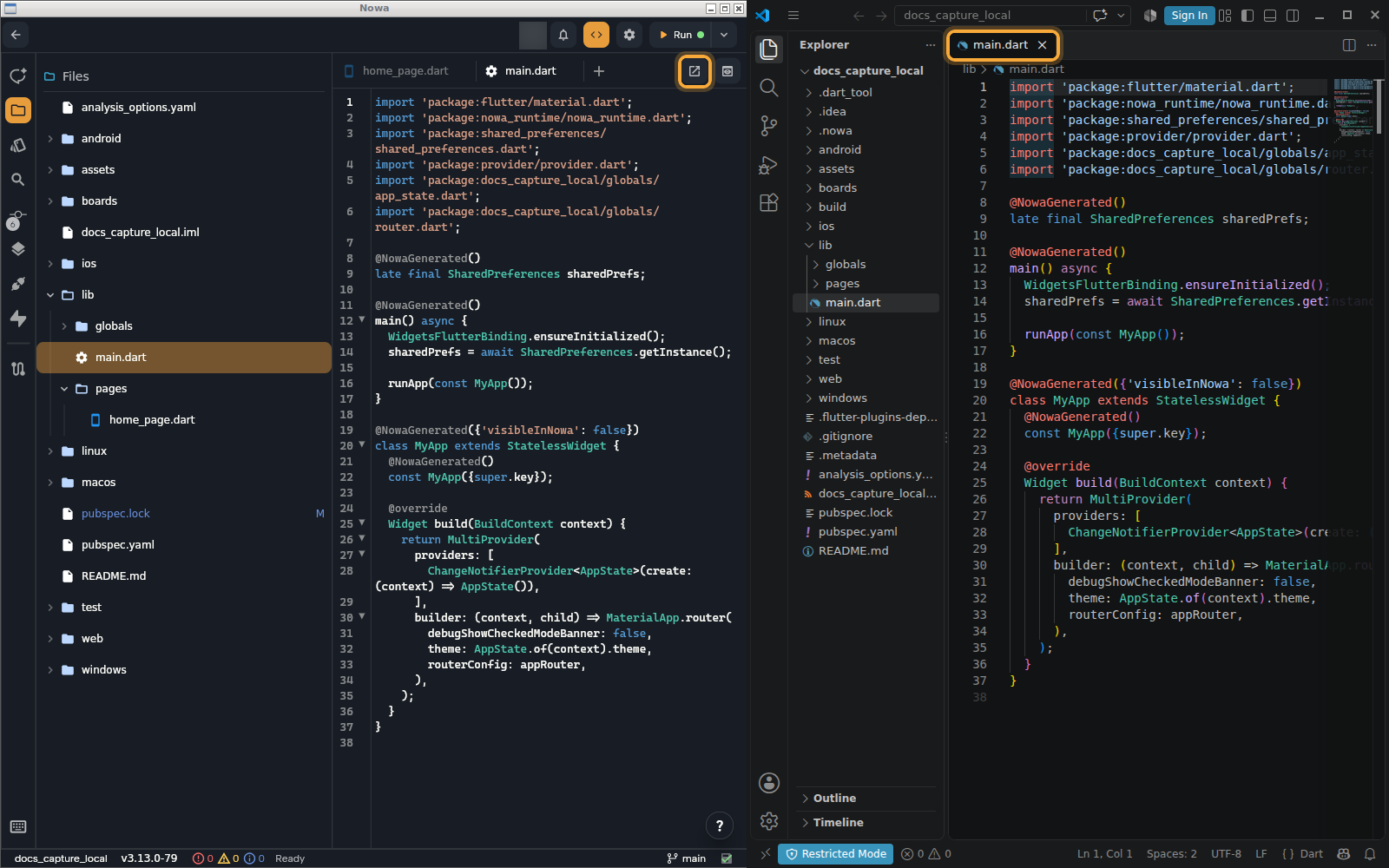
Two more shortcuts:
- In code mode, right-click a file or folder in Files and choose View in folder to show its folder in your file manager.
- Outside code mode, on a plain text file tab, click Open in VS Code in the details panel.
If Nowa can't start VS Code, it opens the file in its own editor tab instead. Check the path in the next section.
Prefer another editor? The folder is a normal Flutter project, so Android Studio, IntelliJ or any other editor can open it too. Everything on this page about syncing works the same way; Open in VS Code is only the shortcut Nowa builds in for VS Code.
Set the VS Code path
Nowa starts VS Code by running the code command that lives in a folder you choose.
- Open settings: click Settings in the dashboard sidebar, or click your avatar in a project's top bar and choose General Settings.
- Under Editor Settings, click Local Setup.
- In VS code Path, enter the folder that contains the
codecommand, or click Browse.
The default is /usr/local/bin on macOS, /usr/bin on Linux and C:\Program Files\Microsoft VS Code\bin on Windows. If your computer has no code command, install it from VS Code first.
What syncs and when
Nowa watches your project folder, so you never copy anything between the two tools.
| You do this | What happens |
|---|---|
| Save in Nowa (Ctrl/Cmd + S, or autosave) | Nowa writes your changes to the files in the folder, so VS Code sees them. In code mode, the edits you typed are compiled into the design on save. |
| Save a file in VS Code | Nowa notices a moment later and reloads the file. The board updates, and a new file in lib/ shows up too. A new file in the lib/ or boards/ folder of a package in a workspace shows up as well. |
| Edit a file right after Nowa saves it | Your edit counts. Nowa remembers what it wrote and compares it with what is on disk, so an outside change isn't lost, however soon it comes. A save that writes a temporary file and renames it over the original counts as a change too. |
| Switch branches or pull in VS Code or a terminal | When more than 10 files change at once, Nowa re-reads the whole project. After any outside change Nowa also re-reads pubspec.yaml and loads the dependencies you added there. |
| Change a file in both places before saving | If you have unsaved edits in Nowa's code editor when the file changes on disk, a banner says "This file changed while you were editing it". Click Keep mine or Reload. |
Autosave is on by default. To change how often it runs, click the save icon in the status bar (tooltip Save options) and use Auto save and Save every. Nowa ignores .git/, build/ and .DS_Store, and never loads the hidden temporary files that editors create while saving, such as .!123!main.dart.
What to expect from your code
Nowa reads your Dart so it can draw it, and writes it back exactly as you wrote it until you change that part visually.
- When you change a screen, component or function visually, Nowa rewrites that declaration on save. It adds
@NowaGeneratedand an import ofpackage:nowa_runtime/nowa_runtime.dart, turns relative imports intopackage:imports, reorders constructor parameters and writes16as16.0. - Saved files follow the page width in your project's
analysis_options.yaml. - Code Nowa can't draw shows as a placeholder on the board. Run compiles everything for real, so use it to check the output.
See Nowa and your Flutter code, Write your own code and What Nowa can show on the board for the full rules.
Run and use Git from either place
Run on a device or simulator from Nowa or from VS Code. In Nowa, saving hot reloads the running app: your change appears on the device in a moment, without restarting the app or losing your place in it (Run on a device or emulator).
To run on your own iPhone, set up signing once in Xcode. Open ios/Runner.xcworkspace from your project folder, add your Apple Account under Xcode → Settings → Apple Accounts, then select the Runner target and pick your team under Signing & Capabilities. A free personal team works for your own devices. Xcode keeps the choice in the project's ios/ folder, and a local project runs straight from that folder, so it sticks. A cloud project's device runs use a copy that Nowa manages, so a change made there may not last. For the phone side, such as Developer Mode, see Run on your iPhone or iPad.
Git works from either place too. Nowa's Git panel, VS Code, GitHub Desktop and the terminal all use the same repository in your folder, so commit, push, pull or switch branches wherever you like. The panel updates when files change outside Nowa.
The same goes for AI coding assistants in your editor: they change the same files, and Nowa picks up what they save.
Next steps
- Write your own code: use the widgets and functions you write in VS Code on the board and in Circuit.
- Edit code in Nowa: make a quick change without leaving Nowa.
- Use Git: commit and sync from Nowa's Git panel.
- Run on a device or emulator: test on your phone or a simulator, with hot reload.