Nowa 3.14.1: A smoother road to the stores
Nowa 3.14.1 makes designing faster and brings your app closer to the stores. 🎨 The board now works like the design tools you know, with a zoom menu and familiar shortcuts, the Library can show your widgets as a grid of previews, and you can swap any widget for one you copied. Your app icons and Android builds are also readier for the App Store and Google Play, and your forms can check that two fields match.
📋 Check all the details of this release in the changelog.
New in This Version ✨
-
🏪 Smoother Road to the App Store and Google Play
- App Store-ready icons: Nowa gives your iOS app icon a white background, because Apple doesn't accept icons with transparency.
- Local notifications on Android: apps that use them build for Android right away. Nowa adds the setting they need for you.
- AdMob reminders: Nowa tells you when AdMob is missing its Android or iOS App ID, and takes you to its settings.
- SHA-1 keys: paste them into Firebase Authentication with or without colons.
-
📝 Better Forms and Data
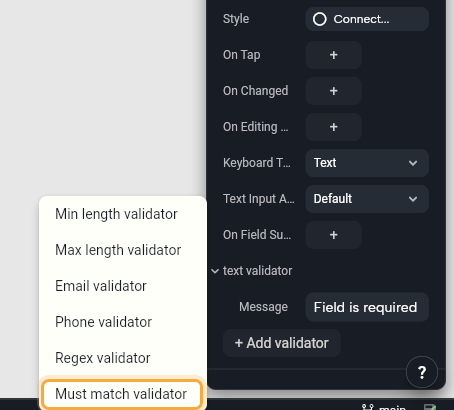
- "Must match" check: make sure two fields match, like Repeat password and the password. Select the field, open its validator in Details, click + Add validator and choose Must match validator. See Check what people type.
- Default values: models built from your API use the defaults you set when a response leaves a field out.
- Supabase: your create and update functions send only the fields you filled in.
-
🎨 Move Around Your Board Like in a Design Tool
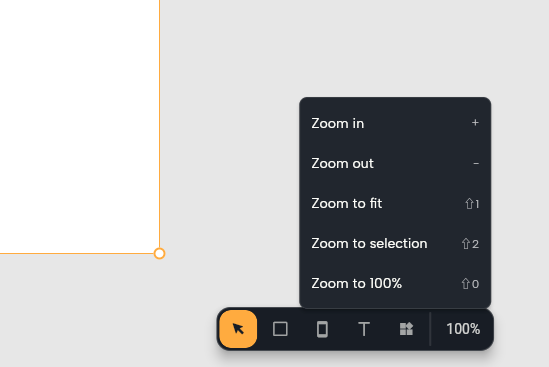
- A zoom menu: click the zoom level in the board toolbar to zoom in or out, fit everything, zoom to your selection or go back to 100%.
- Familiar shortcuts: + and - zoom in and out, Shift + 1 fits everything, Shift + 2 zooms to your selection and Shift + 0 goes to 100%. Double-click to go one layer deeper, press Enter to select the layers inside, and press Shift + Enter or Esc to go back up. See Keyboard shortcuts.
- Clear layer names: the Outline names each layer by what it shows, such as an icon's name or an image's file.
-
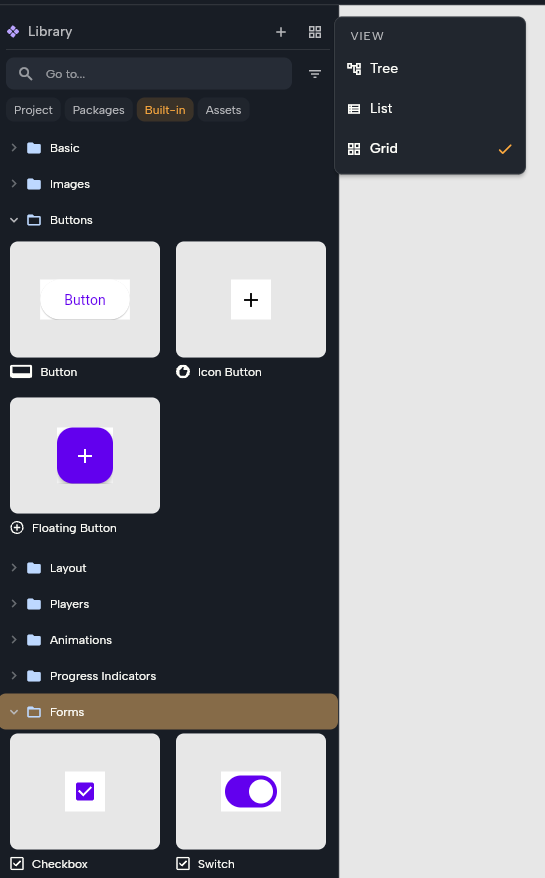
🗂️ See Your Library as a Grid Open the View menu at the top of the Library and choose Grid to see your widgets as a grid of previews. Choose Tree or List to switch back. See Find and add things with the Library.
-
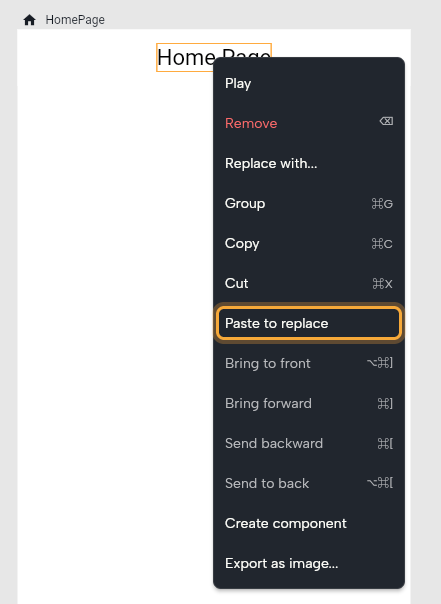
🔁 Paste to Replace Copy a widget, right-click another one and choose Paste to replace. Your copy takes its place and keeps its layout, and one undo brings the old one back.
-
✏️ Quicker Edits
- Paste SVGs from anywhere: an SVG copied from another app or a website becomes an image in your assets.
- Arrow keys in number fields: press Up or Down to change a value like the width by 1, or hold Shift to change it by 10.
- New screens appear in the middle of your view.
- Text shows its real font and size in Details, including the ones that come from your theme.
- Undo a rename: renaming a component in Details can be undone like any other change.
-
🤖 Smarter AI Help
- Several widgets at once: select a few widgets and ask Nowa AI for a change, and it changes all of them.
- Keeps going on its own: if the connection goes quiet in the middle of a task, Nowa AI picks it up again by itself.
-
✨ Smaller Touches
- Smoother updates on Mac: Nowa puts the new version in place before it restarts.
- Menus show every entry, up to the height of your screen.
- Copy from help: you can select and copy the text in help popups, handy for IDs and keys.
- Faster Library previews when you point at a widget.
- Clearer Circuit steps: each step shows what it acts on, such as
emailController.clear, so similar steps are easy to tell apart.
-
🤝 Your Own AI Agent, Working With Your Team When you connect Claude Code, Claude Desktop or Cursor to Nowa and design in your team's UI package (a package that holds your team's widgets and screens, without an app of its own), your agent works the way a designer would:
- A tidy board: each screen and component lands on your board in its own row, with its states (such as Loading, Empty and Error) beside it and, for a screen, its prototype at the end. Your agent checks every state before it says it's done.
- Sample data stays out of your app: previews, sample data and prototypes go to a
design/folder, so your app only ships the real widgets. - You stay in control: Nowa asks you before your agent changes a file outside the package, like your developers' app. Click Allow or Cancel.
- Builds on the first try: fonts and components your agent adds work in your team's app right away.
Connecting your own agent is Enterprise only. See Connect your own AI agent.
-
💻 For Those Who Code Clone a cloud project to your computer without installing Flutter first, and the Git panel picks up commits and branch changes you make outside Nowa as soon as you come back. In code mode, right-click a folder to create a file or folder inside it, and Nowa offers a one-click fix when you
awaita function that's no longer async.
Bug Fixes 🩹
We fixed more than 30 bugs across the visual designer and board, the Outline, forms and validators, Nowa AI and connected agents, Firebase, Supabase, Android builds, Play mode, sending feedback and updates on Mac. See every fix in the changelog.
➡️ We'd love to hear how the new board feels! Click the ? icon to chat with us directly, or email us at team@nowa.dev. Happy building!