Nowa 3.18: Package Widgets on Your Board and Flutter 3.50.1
With Nowa 3.18, the widgets your packages bring show up on your board just as they will in your app, and Nowa moves to Flutter 3.50.1. Nowa AI can now look up the latest docs, try your APIs for real before it writes code for them, and use Git for you. 🚀
📦 See your package widgets for real, right on the board
Until now, widgets from most packages showed on the board as a placeholder box, and you had to click Run to see what they really looked like. Nowa now runs the package's own code, so its widgets look on your board just like in your app. Add a shimmer to a loading card, a star rating under each coffee or a ring that shows how full a reward card is, and design around the real thing.
- Popular packages just work. Widgets from
shimmer,percent_indicator,flutter_rating_bar,badges,animated_text_kit,like_button,flutter_spinkit,flutter_slidable,dotted_border,animate_doandflutter_staggered_animationsshow up for real as soon as you add the package. - Bigger ones when you want them. Packages like
fl_chart,flutter_quillandflutter_markdown_pluswork too, but take a few seconds to load, so you choose: open the Library, right-click the package and choose Load from source. Use placeholders puts it back. - Markdown and HTML that look right. The Markdown and Html widgets in the widget panel now use
markdown_widgetandflutter_widget_from_html_core, so your formatted text shows on the board as it will in your app.
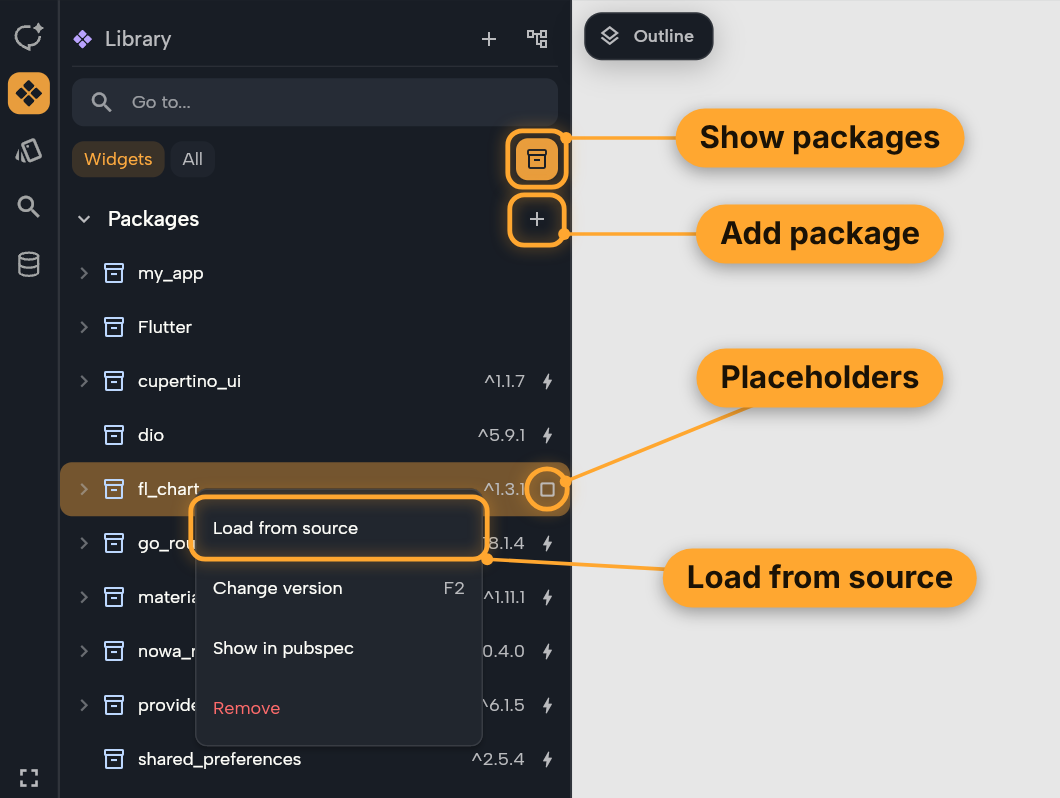
Your packages now live in the Library too, next to everything else you put on your board. Click Show packages (the box icon next to Widgets and All) to see them. The icon at the end of each row tells you how the board shows it: a bolt when it's built into Nowa, code when it runs from its own source, and a square for placeholders. Click + next to Packages to add one, or right-click a package to Change version, Show in pubspec or Remove it.
🧩 Flutter 3.50.1, whenever you're ready
Nowa now runs on Flutter 3.50.1, and your apps build on it in the cloud. Flutter 3.50 moves Material and Cupertino into their own packages, material_ui and cupertino_ui. Your app keeps building as it is, so you can move over when it suits you.
When you open an existing project, the Update for Flutter 3.50.1 card at the bottom right offers the move. Click Update, and Nowa does it for you:
- Safe to try. Nowa first commits any changes of yours, so Discard all in the Git panel undoes the update alone. A project without Git gets it set up first, with Set up Git & update.
- Your code moves with it. Nowa updates your imports and moves packages like
go_router,google_fontsandflutter_stripeto their new releases. - Checked when it's done. Nowa checks your project right away and lists anything left in Problems. Click Fix with AI and Nowa AI takes it from there.
Building for Android? If your Android files are too old for Flutter 3.50, Nowa asks before your next Android build and, in most projects, only raises the version numbers it needs. Working on a local project? Update Flutter on your computer to 3.50.1. Until you do, the version in the status bar turns amber to remind you.
🤖 Nowa AI checks the docs, tries your APIs and uses Git
- Up to date, not from memory. Nowa AI can now search the web for anything that may have changed since it was trained, like a package's latest version or an API's model names. The chat shows Searching the web.
- Real API calls before any code. Ask Nowa AI to use an API, and it tries the request first and reads the real answer, so the code it writes fits the data you'll get. If something's off, like a wrong key, it sees the API's own error instead of guessing. The chat shows Calling api.example.com.
- Git, by asking. Ask Nowa AI to "commit my changes", "show my last 3 commits" or "revert my last commit". It can show your history and changes, commit, switch branches and revert a commit. Discarding changes, deleting branches, pushing and pulling stay with you, in the Git panel. See Use Git.
Deep Thinking, the level for big features and tricky logic, now runs on Google's Gemini 4 Neon. It uses more credits per step than before.
⚡ Faster to open, on the web and in the cloud
Nowa on the web now keeps what it has already downloaded, so when you come back, it opens in about 2 seconds instead of 5 to 9, in our tests. Cloud projects open faster too, big ones above all: Nowa gets your folders and settings in one go and checks your code once everything has loaded, instead of after every file.
📰 What's new, right inside Nowa
When a new version arrives, click Read more on its banner to read the release notes right inside Nowa, with the video playing in place. Open in browser takes you to this page. A banner you close now stays closed on all your devices.
That's the big stuff! 📋 For every fix and smaller improvement, see the changelog for 3.18.0 and 3.17.4.
➡️ We'd love to hear how your packages look on the board. Click ? at the bottom of the left sidebar and choose Support to message us, or email us at team@nowa.dev. Happy building!